



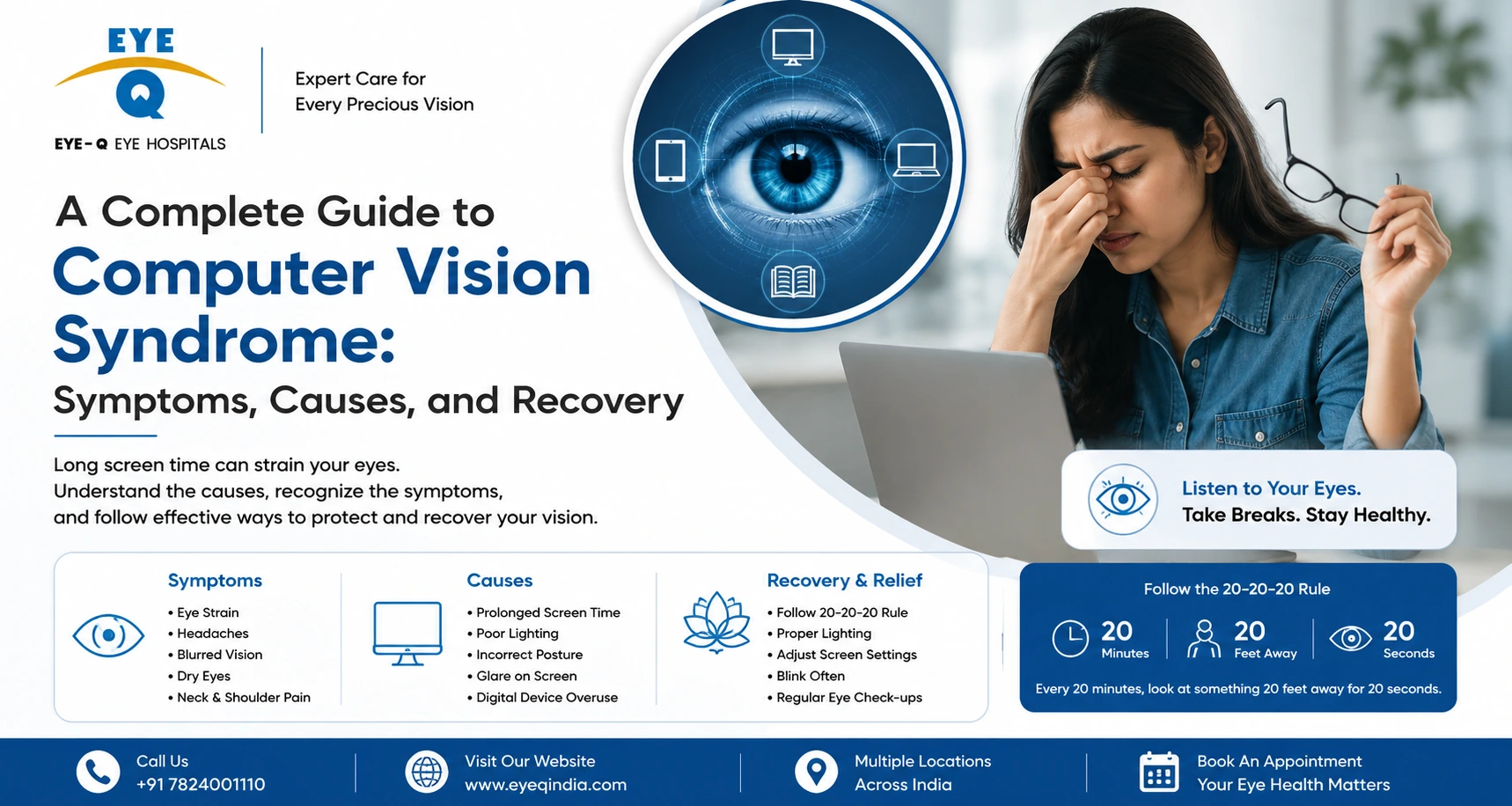
What Is Computer Vision Syndrome?
Spending hours on screens every day? You may already be experiencing Computer Vision Syndrome a growing epidemic affecting millions of screen users worldwide. Here’s everything you need to know, including causes, symptoms, treatment options, and when to see a specialist.
Key Statistics
| 90% Screen users affected |
7hr+ Avg daily screen time |
50% Reduced blink rate on screens |
1–2% Ideal keyword density |
What Is Computer Vision Syndrome (CVS)?
Computer Vision Syndrome (CVS), also referred to as computer eye syndrome or digital eye strain, is a group of eye and vision-related problems that result from prolonged use of digital screens – including computers, smartphones, tablets, and e-readers.
The American Optometric Association defines CVS as a complex of eye and vision problems related to activities that stress the near vision and are experienced in relation to, or during, digital screen use. It is not a single condition but rather a spectrum of symptoms that worsen with extended screen exposure.
Unlike reading a printed book, staring at a screen demands far more from your visual system. Screens flicker, emit blue light, and offer lower contrast than print – all of which force your eyes to work harder to focus and refocus continuously.
| 👁 Eye-Q Expert Insight
The human eye blinks approximately 15–20 times per minute under normal circumstances. When using a screen, this drops to just 5–7 times per minute, causing the tear film to evaporate faster and leading to dryness, irritation, and blurred vision. |
Signs & Symptoms of Computer Vision Syndrome
Symptoms of computer syndrome can vary depending on how long you use screens, your viewing distance, your posture, and whether you have any uncorrected vision problems. Common symptoms include:
👁 Eye Strain – Tired, aching eyes after screen use
💧 Dry Eyes – Burning, gritty, or watery sensation
🔵 Blurred Vision – Difficulty focusing after prolonged use
🤕 Headaches – Especially around forehead and temples
↔️ Double Vision – Images appear as two overlapping pictures
🔆 Light Sensitivity – Discomfort or pain in bright light
🙇 Neck & Shoulder Pain – Poor posture worsens eye fatigue
💦 Eye Discharge – Crusting or discharge around the eye
These symptoms typically occur during or immediately after extended screen use and may persist for several hours. In severe cases, they can impact daily work performance and quality of life.
What Causes Computer Eye Syndrome?
Several factors contribute to the development of computer vision syndrome causes:
◆ Poor Lighting: Overly bright or dim room lighting creates glare on screens, increasing visual stress.
◆ Screen Glare: Reflections from windows or overhead lights on your screen surface.
◆ Improper Viewing Distance: Screens placed too close or at an awkward angle strain focus muscles.
◆ Uncorrected Refractive Errors: Unaddressed short-sightedness, long-sightedness, or astigmatism significantly worsens digital eye strain.
◆ Reduced Blink Rate: Blinking less frequently dries out the eye surface and causes irritation.
◆ Blue Light Exposure: High-energy visible blue light emitted by LED screens penetrates deeper into the eye.
◆ Poor Posture: Hunching forward or an improperly angled monitor worsens neck, shoulder, and eye strain.
◆ Screen Brightness: Overly bright or dim screens both force your eyes to compensate continuously.
The 4 Types of Eye Problems from Screen Use
When discussing eye problems associated with computer use, four distinct categories commonly emerge:
| Type | Description | Main Symptom |
|---|---|---|
| 1. Accommodative Problems | Difficulty shifting focus between near and far objects after prolonged close-up screen work. | Blurred vision, slow focusing |
| 2. Binocular Vision Issues | Disruption in how both eyes coordinate together, leading to double vision or visual fatigue. | Double vision, eye strain |
| 3. Ocular Surface Disease | Tear film breakdown and dry eye disease triggered by reduced blinking during screen use. | Dry, burning, itchy eyes |
| 4. Extraocular Muscle Fatigue | The muscles that move your eyes become fatigued from sustained near focus, especially without breaks. | Aching eyes, neck/shoulder tension |
Understanding which type of eye problem you’re experiencing helps your eye specialist at Eye-Q determine the most effective management approach.
Can You Fix Computer Vision Syndrome?
Yes – in most cases, computer vision syndrome can be successfully treated and managed. The key is identifying your specific symptoms and addressing the underlying causes, which may involve lifestyle changes, corrective eyewear, or medical treatment.
💊 Lubricating Eye Drops: Artificial tears prescribed by your ophthalmologist help replenish the tear film and relieve dryness caused by reduced blinking.
👓 Prescription Eyewear: Computer glasses with anti-reflective coating, blue light filter, or specific power corrections can dramatically reduce visual fatigue.
🏥 Vision Therapy: For binocular vision problems, structured exercises prescribed by your eye doctor can retrain the visual system to coordinate efficiently.
🌡 Warm Compresses: Applying a warm compress to closed eyelids for 10–15 minutes can help stimulate meibomian gland activity and improve tear quality.
⚙️ Ergonomic Adjustments: Repositioning your screen 50–70 cm from your eyes at a slightly downward angle can significantly reduce strain on eye muscles.
🔆 Screen Settings: Adjusting brightness, contrast, font size, and enabling night mode on devices reduces the visual demands placed on your eyes.
Can Glasses Fix Computer Vision Syndrome?
Yes – to a significant extent. The right prescription glasses can be one of the most effective tools for managing CVS, especially when uncorrected refractive errors are contributing to the problem.
Types of Glasses That Help
◆ Computer Glasses (Single Vision Lenses): Specially prescribed for the intermediate distance of a computer screen (50–70 cm), with full-width anti-reflective lens coatings.
◆ Blue Light Blocking Glasses: Filter high-energy blue-violet light (wavelength 415–455 nm) emitted by LED screens, reducing retinal stress and improving sleep quality.
◆ Progressive Lenses: For those over 40 who need correction at multiple distances – near, intermediate (screen), and far.
◆ Anti-Reflective Coated Lenses: Eliminate internal and external reflections, reducing glare from screens and overhead lighting.
It’s important to note that off-the-shelf ‘computer glasses’ available online without a prescription may not be effective – and could even worsen symptoms. Always get a comprehensive eye examination and prescription from a qualified ophthalmologist before purchasing computer eyewear.
| ⚠️ Important Note
Glasses help relieve the symptoms and improve visual comfort, but they do not correct the underlying structural cause of Computer Vision Syndrome. Healthy screen habits, proper ergonomics, regular breaks, and an optimized work environment are equally important for long-term relief and recovery. |
Does Computer Vision Syndrome Go Away?
The answer depends on how consistently you address the contributing factors:
Short-term relief can often be achieved within a few days of implementing screen breaks, the 20-20-20 rule, and lubricating eye drops. Many people notice significant improvement in dryness and eye strain within 48–72 hours of reducing screen exposure.
Long-term resolution requires sustained behavioral changes. If you return to the same screen habits without any ergonomic or optical corrections, symptoms will almost certainly return. CVS is a chronic, recurrent condition for most modern screen users – the goal is not just short-term relief but sustainable management.
In cases where an underlying refractive error, dry eye disease, or binocular vision disorder is driving the symptoms, these conditions need active medical management and may not resolve without intervention from an eye specialist.
How Long Does It Take for Computer Vision Syndrome to Improve?
Recovery timelines vary based on the severity of your symptoms and how proactively you address the causes:
◆ Mild cases (occasional eye strain): 1–3 days with screen breaks, good lighting, and lubricating drops.
◆ Moderate cases (daily discomfort, dry eyes): 1–3 weeks with sustained ergonomic changes, prescribed drops, and corrective eyewear.
◆ Severe cases (chronic dry eye, binocular issues): Several weeks to months, with structured treatment from an eye specialist including vision therapy, prescription drops, and follow-up consultations.
The most important factor in recovery is consistency. Partial measures taken inconsistently rarely lead to lasting improvement. An evaluation at an Eye-Q centre can help determine exactly what’s driving your symptoms and how long you should expect to see improvement.
Prevention: The 20-20-20 Rule & More
The most widely recommended strategy for preventing digital eye strain is the 20-20-20 rule – a simple, evidence-based habit that can dramatically reduce eye fatigue:
| 👁️ The 20-20-20 Rule
Every 20 minutes, take a 20-second break and look at something 20 feet away. ⏱ Every 20 MINUTES →👀 Look for 20 SECONDS→📍 At 20 FEET AWAY |
Additional Prevention Tips
◆ Blink consciously: Remind yourself to blink fully every few minutes to keep the tear film refreshed.
◆ Adjust your workspace: Position the screen 50–70 cm away, with the centre of the screen slightly below eye level.
◆ Manage glare: Use an anti-glare screen protector and position monitors away from direct light sources or windows.
◆ Limit screen brightness: Match screen brightness to the ambient room light – screens that are significantly brighter than the room cause eye strain.
◆ Take regular breaks: Follow a pattern of at least 5–10 minutes off-screen for every hour of computer work.
◆ Get regular eye exams: Annual comprehensive eye check-ups help detect and correct any refractive errors that worsen CVS.
Also Read: More Eye Care Topics
If you found this article helpful, you may also want to read more about related eye health topics covered on the Eye-Q India blog and website:
🔍 What Happens During a Comprehensive Eye Check-Up? – Learn what to expect at your annual eye examination
👓 How to Choose the Right Glasses for Screen Use – A guide to anti-reflective, blue-light and computer lenses
🎯 What Is a Refractive Error and How Is It Corrected? – Understanding short-sightedness, long-sightedness and astigmatism
⚡ LASIK Surgery: Are You a Good Candidate? – Find out who qualifies for laser vision correction
🌡 Screen Time and Glaucoma: What You Need to Know – How prolonged screen use can affect eye pressure
🧪 Take a Free Online Eye Test – A quick way to check your vision from home
|
👁️ When Was Your Last Eye Check-Up? Regular eye check-ups are the best way to catch vision problems early. If you’ve been spending long hours in front of screens, now may be the right time to have your eyes examined by an eye specialist. |
Medical Disclaimer
This article is intended for informational purposes only and does not constitute medical advice. Always consult a qualified ophthalmologist or eye care professional for diagnosis and treatment of eye conditions. Eye-Q Vision Pvt. Ltd. is not responsible for decisions made based on the content of this article.
Frequently Asked Questions
Can you fix Computer Vision Syndrome permanently?
CVS can be managed very effectively and its symptoms can be eliminated with the right combination of habits, ergonomics, corrective eyewear, and – where needed – medical treatment. However, if you continue using screens for long hours (as most modern professions require), it is an ongoing condition to manage rather than a one-time cure. Sustained screen hygiene practices, regular eye check-ups, and appropriate glasses are the keys to keeping it well under control.
What is Computer Vision Syndrome?
Computer Vision Syndrome (CVS) is a cluster of eye and vision-related symptoms resulting from prolonged digital screen use. It was formally described by the American Optometric Association to capture the growing number of patients reporting eye strain, dry eyes, headaches, and blurred vision from computer use. Today it is also called Digital Eye Strain (DES).
How long does it take for Computer Vision Syndrome to improve?
Mild cases often improve within 1–3 days of taking screen breaks and using lubricating eye drops. Moderate symptoms typically resolve within 1–3 weeks with consistent ergonomic changes and corrective eyewear. Severe or chronic cases – particularly those involving dry eye disease or binocular vision problems – may require several weeks to months of managed care with regular follow-up at an eye clinic like Eye-Q.
Can glasses fix Computer Vision Syndrome?
Yes – prescription glasses with anti-reflective coating, blue light filtering, or specifically tailored intermediate-distance correction can significantly reduce CVS symptoms. However, over-the-counter ‘computer glasses’ without a proper prescription are not recommended. A comprehensive eye evaluation at Eye-Q will determine the exact prescription and lens type that will work best for your specific needs.
What are the 4 types of eye problems from screen use?
The four main types are:
(1) Accommodative problems – difficulty focusing after screen use;
(2) Binocular vision issues – poor eye coordination causing double vision;
(3) Ocular surface disease – dry eye condition caused by reduced blinking; and
(4) Extraocular muscle fatigue – tiredness in the eye muscles that control movement and focus.
Your Eye-Q specialist can test for all four categories in a single consultation.
When should I worry about eye discharge from CVS?
Minor watering or crusting can occur with dry eye disease associated with CVS. However, if you notice thick, yellow, or green discharge, significant redness, swelling of the eyelids, or pain, you should consult an eye doctor promptly as these may indicate an infection (conjunctivitis or blepharitis) rather than simple CVS, and will require specific treatment.